
Content Hub & Marketplace
Sell your course from one link. One fee, processing included.
Put your videos, lessons and downloads in one library, lock them with a badge and sell access one-time or monthly from a single link. Fans pay on their phone and the content unlocks in their library.
Free plan, no credit card. Connect Stripe when you are ready to sell.
- 10% fee on Free, down to 5% on Premium
- Stripe processing inside that fee, not on top
- Paid out to your own Stripe account

Your content. Your price. One link.
Start free1 · Content Hub
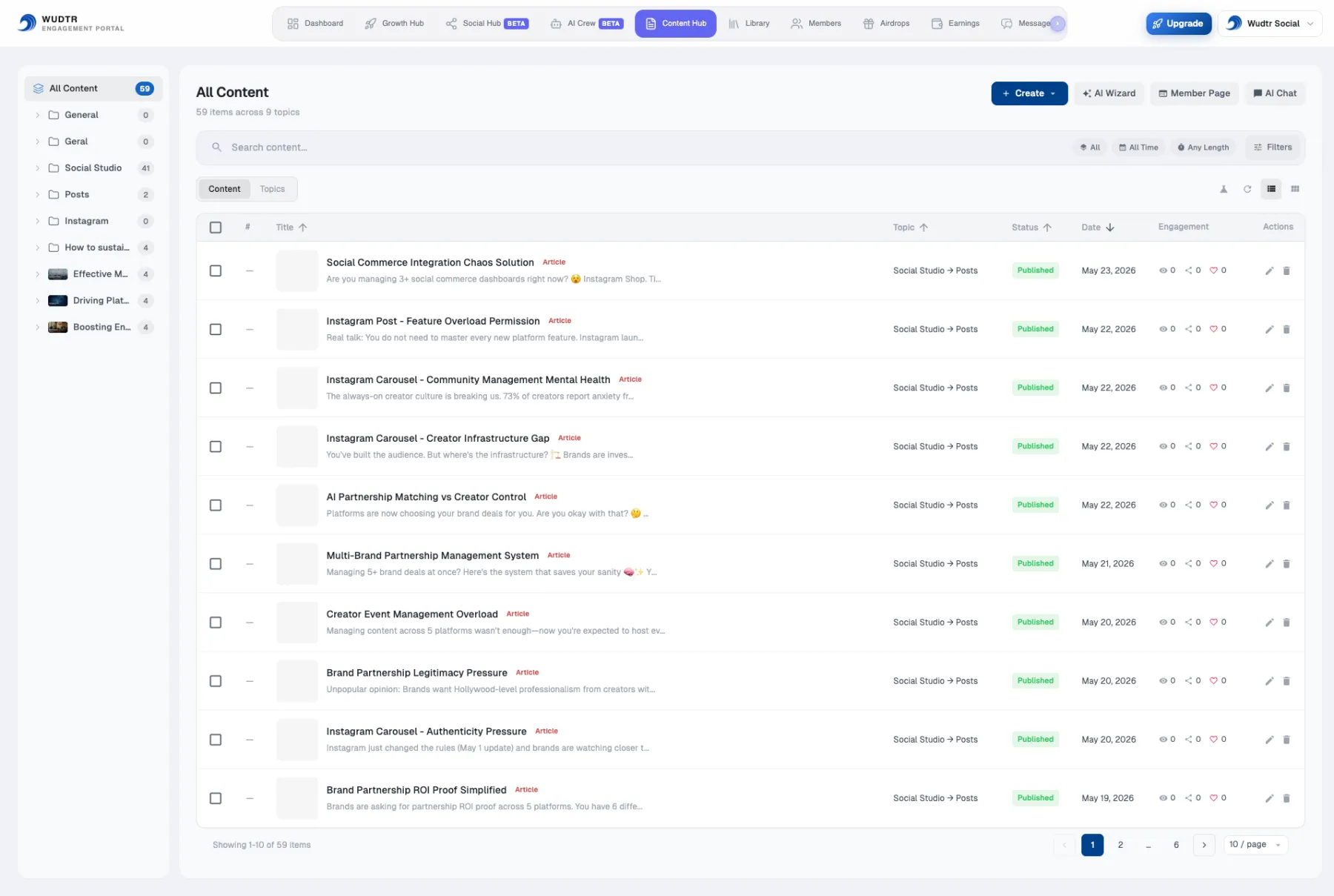
Build your library
Everything you sell lives in one place, organised the way your course is taught.
- Topics and subtopics. A program becomes a topic, each week a subtopic, each lesson an item you can reorder.
- Videos, articles and documents. Upload video and it is streamed in adaptive quality, or link a YouTube or Vimeo video you already have.
- Start from what you have. The AI Content Wizard (beta) imports PDF, Word, text or Markdown files and sorts them into topics for you.
2 · Badges & access
Lock it with a badge
A badge is the key to your content. Put one on a whole topic or on a single lesson, and only members who hold it can open it.
- Bought. Buying a product hands the member its badges automatically.
- Verified. YouTube channel members can verify their membership to receive a badge.
- Given. Assign a badge by hand to a student, a partner or a giveaway winner.
Content with no badge stays open to every member, so free lessons and paid ones can sit side by side.
3 · Products
Price it. Share one link.
A product bundles badges with a price. Each product gets its own public link to put in your bio, your videos or a message.
- Monthly, yearly or one-time. Or free, to collect members before you charge.
- Attach a file. A PDF, Word or PowerPoint file up to 50 MB is delivered to the buyer after payment, so an ebook needs nothing else.
- See what you keep before you publish. The fee breakdown is on the form, and the platform fee already covers payment processing.
- Buyers only need an email. No account to create first: we set it up and send them their access link.
4 · Marketplace
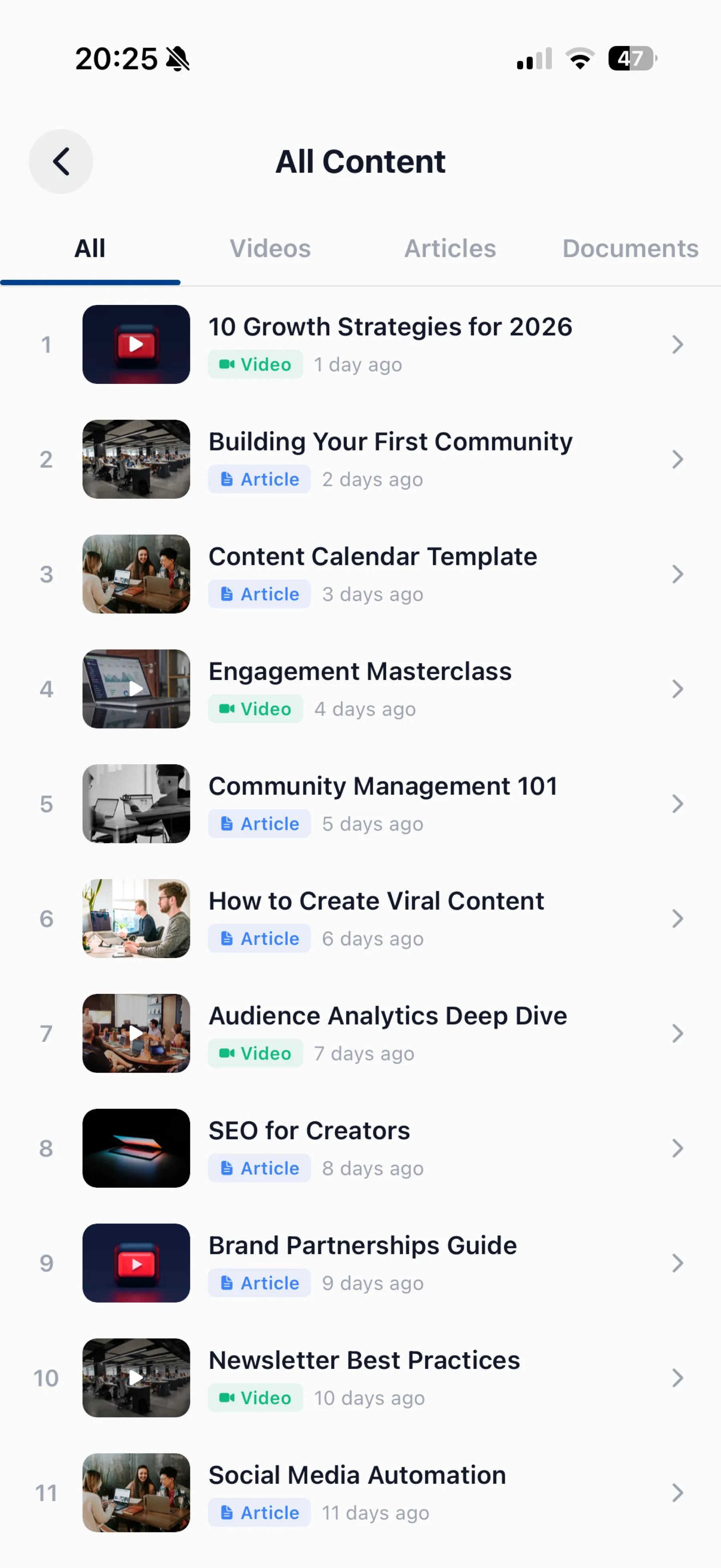
Fans unlock it on their phone
Most of your audience will open your link on a phone, so the whole purchase happens there.
- Public checkout. Email, card, done. It works in any mobile browser, with secure payment through Stripe.
- Unlocked when the payment clears. The badge lands on their account and the locked lessons open.
- One library to come back to. On the web or in the Wudtr app for iOS and Android, with videos, articles and documents in their own tabs.
Monthly and yearly buyers keep access while they pay. If they cancel, access lasts until the end of the period they paid for.
5 · Earnings
Get paid. See every sale.
Earnings shows gross revenue, platform fees and what you actually keep, product by product, with your active subscribers and payouts.
- Payouts to your bank. Money goes to your own Stripe account and from there to your bank, on Stripe's schedule.
- One number for fees. The fee falls as your plan rises, and Stripe's processing comes out of our share, not yours.
- Export to CSV whenever your accountant asks.
What you keep from a $49 sale
| Plan | Fee | You keep |
|---|---|---|
| Free | 10% | $44.10 |
| Basic | 8% | $45.08 |
| Standard | 7% | $45.57 |
| Premium | 5% | $46.55 |
Payment processing is included in every fee above. Paid plans have a monthly price of their own; see pricing.
How it works
From a folder of files to your first sale
- 1
Create a free account
No card. Your Content Hub and member page are ready straight away.
- 2
Add your content
Upload videos and files or import documents, then arrange them into topics.
- 3
Create a badge and a product
Lock the paid topics with a badge, set the price and connect Stripe so you can take payments.
- 4
Share the link
Put it in your bio, your videos and your messages. Every sale shows up in Earnings.
Who sells this way
Built for creators who teach something
If you can split what you know into lessons, you can sell it here.
Course creators
Modules as topics, lessons as videos, worksheets as downloads, and one link to sell the whole course.
Coaches and trainers
Programs sold monthly, with free sample workouts that stay open to everyone.
YouTubers
Bonus videos for paying fans, and a badge for channel members once they verify.
Writers and educators
Articles and guides behind a badge, an ebook sold as a one-time download.
Podcasters
Premium episodes and show notes for supporters, sold from the link in your feed.
Communities
Free members and paid tiers on the same library, each tier opening more of it.
Questions
Before you start
What does it cost?
The Free plan costs nothing and needs no card. When you sell, the platform fee is 10% on Free, 8% on Basic, 7% on Standard and 5% on Premium, and it already includes Stripe's payment processing. Paid plans have a monthly price and a 7-day free trial.
Does a buyer need a Wudtr account?
No. They enter their email at checkout and pay. We create the account for them and email an access link, and the content is waiting in their library.
How do I get paid?
Through Stripe. You connect or create a Stripe account from Earnings, sales settle there, and Stripe pays out to your bank. Until Stripe is connected, nobody can complete a paid purchase, so set it up before you share the link.
Can I sell subscriptions and one-off products?
Yes. A product can be monthly, yearly or a one-time payment, or free. Subscribers keep access while they pay; one-time buyers keep it.
What can I put in the library?
Videos you upload, YouTube or Vimeo links, articles and documents, organised into topics and subtopics. The AI Content Wizard, in beta, imports PDF, DOCX, TXT and Markdown files of up to 50 MB each.
Can I give access without charging?
Yes. Make a free product, assign a badge to someone by hand, or let your YouTube channel members verify to receive one.
Get started
Your content. Your price. One link.
Create your free account, build the library and share the link when you are ready. You pay a fee only when you make a sale.
Free plan, no credit card. Connect Stripe when you are ready to sell.