
For talent agencies
Stop running your roster on spreadsheets and email
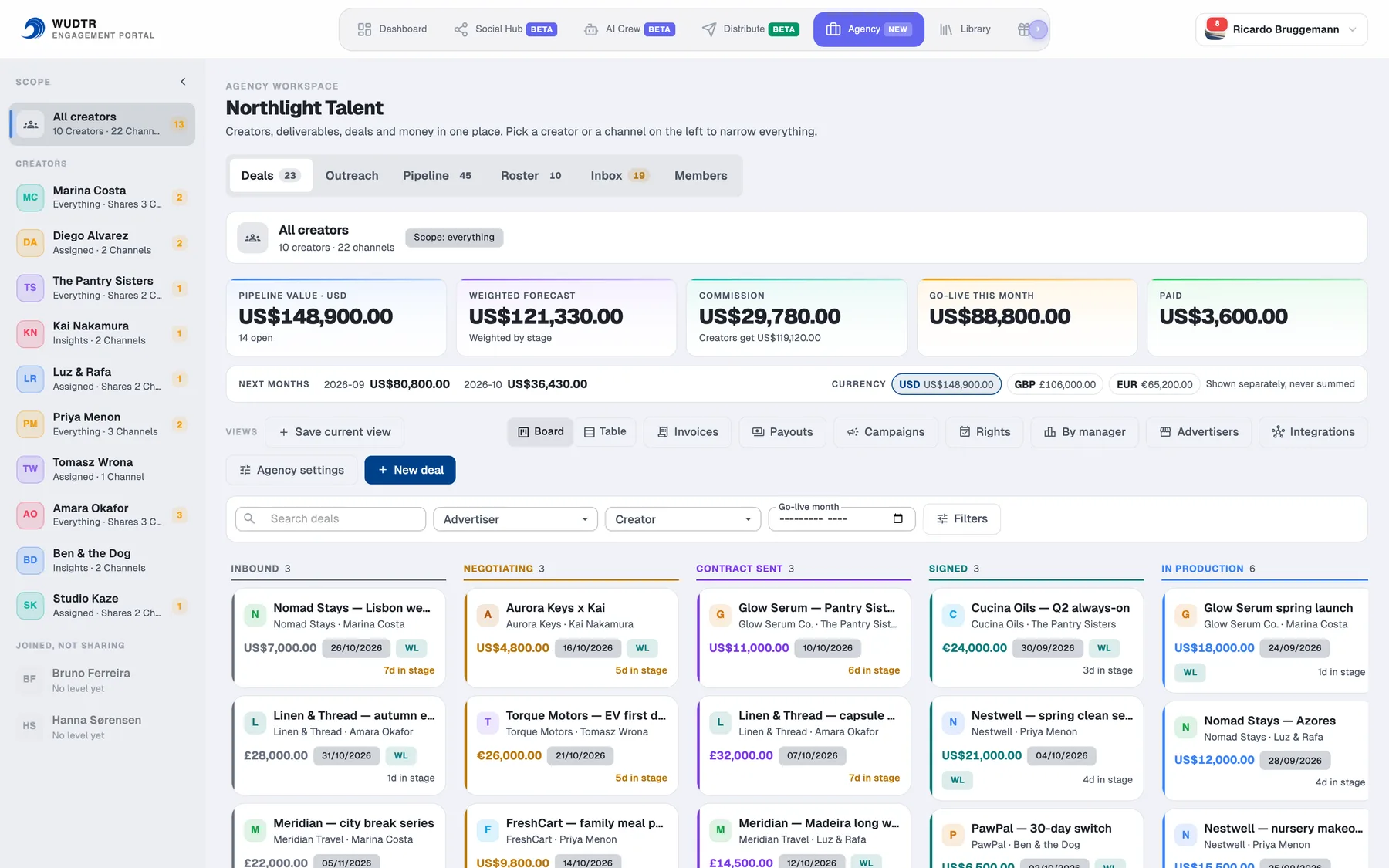
Deals, briefs, brand approvals, contracts, invoices and payouts in one workspace. Creators join with consent and choose what they share. Brands review and sign from a link. The split is decided before the money moves.
Create the agency's free account and we switch the Agency workspace on for your organisation.
- Creators pick a share level and can lower it any time
- Brands review and sign without a login
- Four staff roles, so not everyone sees the money
Bring your roster out of the spreadsheet
Start freeConsent first
What a creator shares, and can take back
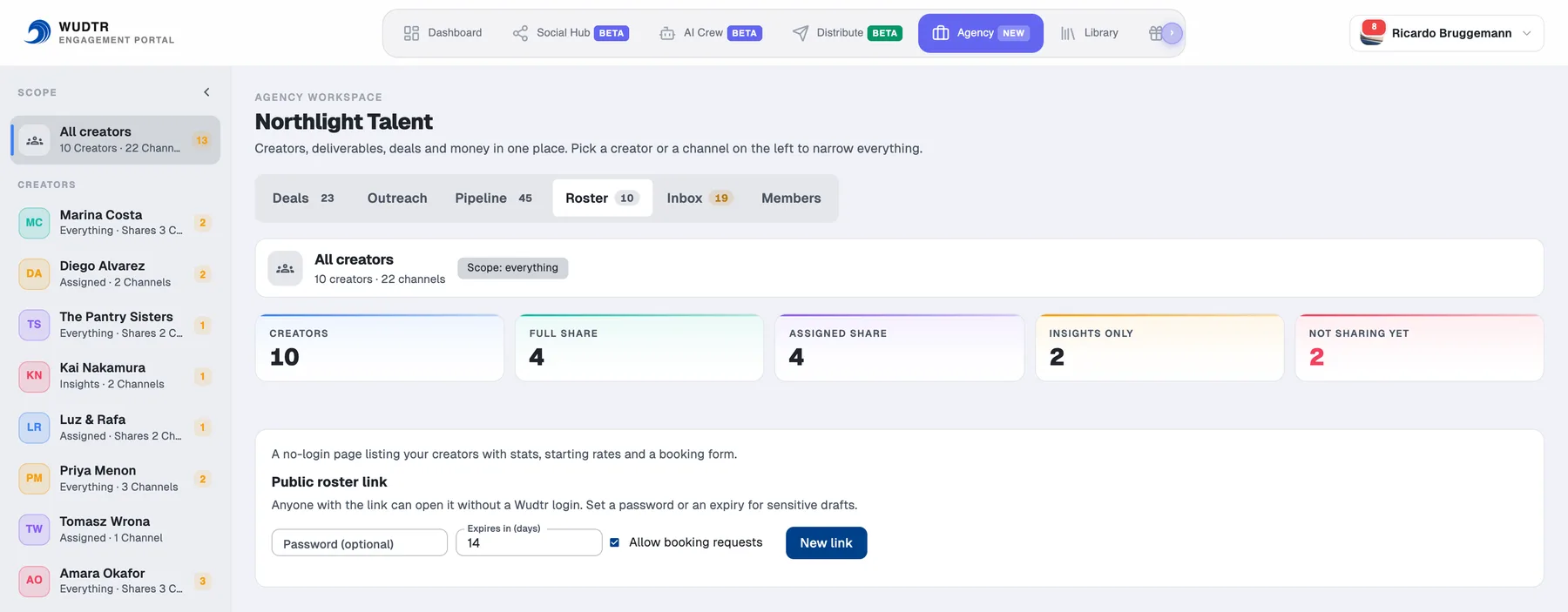
A creator joins by accepting an invitation and picks one of three levels. Each level includes the ones below it. Sharing can be limited to chosen channels, and the creator can lower it or leave from their own account settings at any time. The agency never holds a creator's login.
Insightsinsights
Profile, follower counts and performance stats for the shared channels. Enough to build a media kit and quote a rate; nothing the creator has posted.
Assignedassigned
Insights, plus only the posts the creator has wired to the agency's briefs. Staff can review and, if the creator chose auto-schedule, book the approved post.
Fullfull
Everything on the shared channels, and staff receive ordinary contributor seats in the creator's account, granted and revoked with the level, never by hand.
Briefs
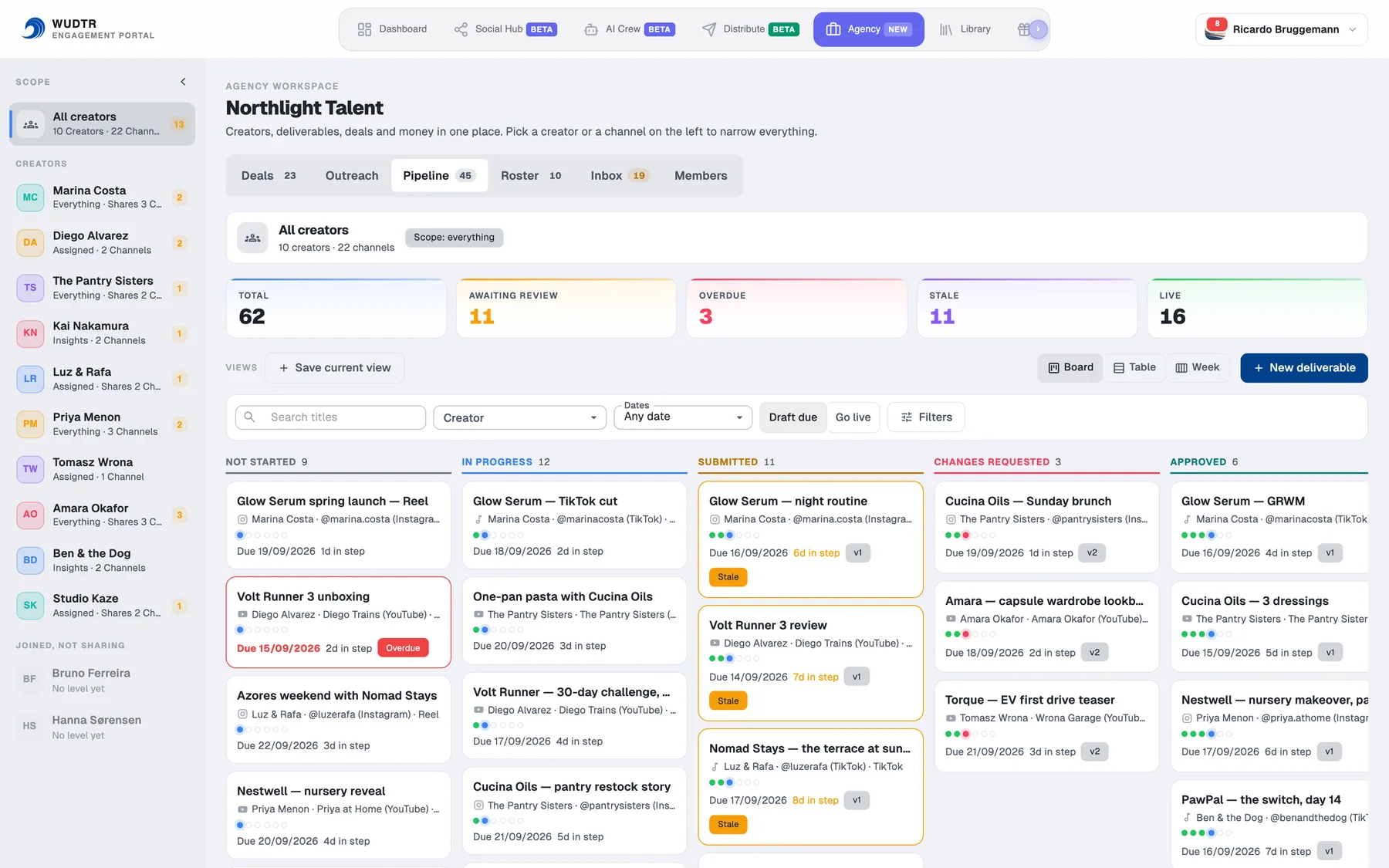
One brief, from start to proof
Every deliverable moves through named statuses. A creator answers a brief once. A brand reviews from a link. Nothing linked to a brief can publish before it is approved, and after it goes live the numbers are captured on days one, seven and thirty.
The creator answers once
A brief arrives in Social Hub on the web and in My agency on the phone, with the fee, the creator's payout, terms and rights. Accept, decline with a reason, or counter on the payout. A counter the agency accepts rewrites the deal's fee from the commission chain.
The brand reviews from a link
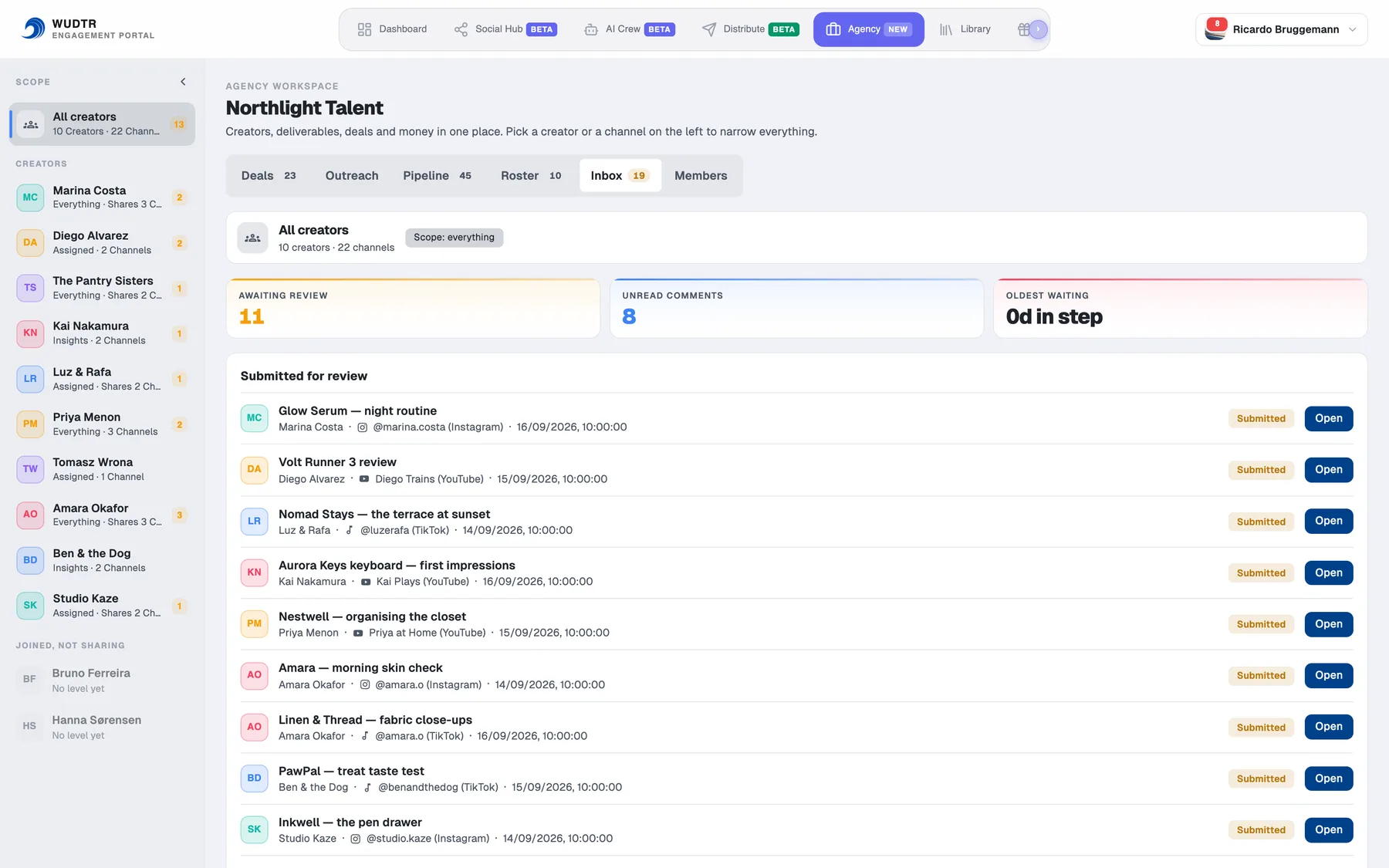
No account. Approve, approve with changes, request changes or reject. The link carries a service level, 72 hours by default; when it lapses the review is recorded as deemed approved and the manager still makes the final call.
Files and comments both ways
Briefs carry attachments from the agency's library; comments from either side carry files too. Downloads are signed per deliverable, and contracts are private documents read through a short-lived link.
Deals and money
A forecast you can check, and a split decided before the money moves
Deals move from inbound to paid through named stages, each with a published weight, so the pipeline total is arithmetic rather than a feeling. Amounts are kept in integer cents in one currency per deal and are never summed across currencies.
A tracking link the creator can see
A deal carries the brand's own tracking link and promo code, shown to the creator on the brief so it reaches the caption. Daily results are recorded, and the brand report puts attributed sales next to the reach figures, bucketed per currency.
Campaigns group deals, not money
File several deals under one campaign for a retainer or a quarter and read it back as one roll-up, per currency. Grouping never moves a number between deals.
Rights windows that warn you
Usage and exclusivity windows are computed from the terms already on the deal, and the workspace warns fourteen days and three days before one closes, so a renewal is a decision rather than a surprise.
Payment modes
Three ways for the money to move, chosen per deal
Each deal carries a payment mode, defaulted from the agency's settings. The mode decides who bills whom, who gets paid by whom, and which tax invoices the deal needs, and the deal drawer shows each step as done, waiting or later. It locks once an invoice is out.
Direct
The creator invoices the brand and is paid straight into their own account. When the brand's invoice is marked paid, the workspace raises the agency's commission invoice to the creator, and the creator confirms with one tap that the brand's money arrived.
Via the agency
The agency invoices the brand for the full fee, collects it and pays the creator their part. The creator invoices the agency for that part, and the payout can be held until their invoice is approved.
Split invoice
The creator and the agency each invoice the brand for their own share, and the brand pays both. Nothing passes through the agency, so there is no payout to make.
Tax invoices, requested and checked
Ask the creator for their invoice from the deal, see it arrive, then approve it or send it back with what needs fixing. The agency attaches its own the same way. Wudtr does not issue tax invoices: each side issues its own, and the workspace keeps track of them.
Pix in Brazil, from your own Asaas account
Connect the agency's Asaas account and a Brazilian real invoice the agency collects gets a Pix charge, with the QR code and copy-and-paste code on the brand's invoice page. Payment is settled automatically, and approved payouts go out in one Pix batch to each creator's own key. The money stays in your Asaas account; Wudtr only sends the orders.
Payment details the creator owns
The creator fills in their own tax ID and Pix key from their Briefs, with explicit consent to share them with the agency, and both are validated before they are saved. Billing emails and the brand's invoice email go out in English or Brazilian Portuguese, following the recipient's account.
Rate cards
What should this deal cost?
The workspace suggests a rate card from a creator's real stats. This is the same arithmetic on numbers you type: a CPM benchmark for the niche, a multiplier for the kind of deliverable, and the premiums and discounts a card can carry.
Illustrative. Rate = views ÷ 1,000 × CPM × deliverable multiplier, then premiums and discounts applied to the total. In the workspace the CPM and views come from the creator's shared stats, and the card is only public once you publish it. You can ask for the quote to be written up as negotiating notes: an ask at 1.25 times the number, a floor at 0.85 and a walk-away at 0.7, with talking points and a line for the obvious pushback. The figures stay the arithmetic above, the model is handed them finished and may not invent others, and credits are charged only once a usable answer comes back.
Staff and paperwork
An agency of eight, not an agency of one
Everyone seeing every creator's money is fine until the second manager joins. Each staff member holds one of four roles, and a manager is scoped further to the creators assigned to them. An empty assignment list means no creators, never all of them.
| Can | Owner | Manager | Finance | Assistant |
|---|---|---|---|---|
| Send briefs, review and approve creative | ✓ | ✓ | ||
| Create and move deals, advertisers, pitches, contracts | ✓ | ✓ | ✓ | |
| Invoices, payouts and anything that moves cash | ✓ | ✓ | ||
| Staff, roles, payout method and settings | ✓ | |||
| Sees the whole roster | ✓ | Own creators only | ✓ | ✓ |
| Writes anything at all | ✓ | ✓ | ✓ | Read-only |
Contracts that actually get signed
Write a template once with merge fields, and the deal fills them in. Three kinds cover the work: a brand deal, a representation agreement, an NDA. Each party gets its own link.
Frozen at send, one link per signer
The wording is frozen the moment it goes out, so nobody edits a contract underneath a signature. Each signer's link is single-use and burns on signing. This is a simple electronic signature and we say so plainly, rather than implying more.
Renewals you are told about
A contract moves draft, sent, partially signed, signed, and the workspace warns thirty days before a renewal date and seven before an expiry, unless the contract sets its own.
Pitch lists and outreach, with a leash
Build a pitch list of creators for a brand and send it as its own link. Outreach sequences are capped on purpose: fifty sends a day per mailbox, six steps, and never more than four approaches to one contact in a month.
Prospects, imported not scraped
Bring the creators you are courting in from the spreadsheet you already keep, up to five hundred rows at a time, with a dry run first so you see what will land. We do not scrape a follower count from anyone who has not joined.
Targets and what a manager brought in
Set a revenue target and read actual booked revenue against it, per manager, so a roster review is a number rather than a recollection.
For brands
Eight links, none of them needing an account
Each public page is a whitelist, field by field: it carries what the reader needs. Internal ids, email addresses, the creator's share level and the commission split never appear on it.
Media kit
A creator's profile, shared-channel stats and, if published, the rate card. It prints cleanly for a brand that still wants a PDF. A booking action on the link turns a request into an inbound deal, held as an unverified lead until your staff confirm it.
Review link
The deliverable, its history and a decision: approve, approve with changes, request changes or reject. Carries the review SLA.
Invoice
The amount, terms and who gets paid. A payment link when the agency collects through Stripe; in Brazil, a Pix QR code and copy-and-paste code per payee, with the approved tax invoices to download. Due-soon and overdue reminders go out from the workspace.
Deal report
Proof of performance from the day 1, 7 and 30 snapshots of every linked post. Snapshots never change after they are written, so the report does not move under a brand's feet.
Roster
The agency's creators at a glance, only what each creator agreed to show, for a brand choosing who to work with.
Pitch list
Several creators put forward for one brief, as their own page rather than a media kit pointed at the first name. It prints as a deck, and it moves through draft, sent, viewed, won or lost, so you know which pitches were actually opened.
Contract to sign
One link per signer, single-use, showing the wording as frozen when it was sent. The brand does not create an account to sign, and neither does the creator.
Calendar feed
Deadlines and go-live dates as a calendar subscription, so the agency's week shows up in the calendar app it already uses. The token is shown once.
Whitelisting, tracked
When a deal needs ads run from the creator's handle, the workspace opens one task per platform: TikTok Spark code, Instagram partnership ads, YouTube brand access. Codes are captured and the brand is told.
For creators
What being on a roster looks like from the creator's side
The creator keeps their own Wudtr account and plan. The agency is a section inside it, not a layer on top of it.
Briefs in Social Hub, and on the phone
Briefs arrive as a tab in Social Hub on the web and as My agency in the mobile app, with the offer spelled out: fee, the creator's payout after commission, terms and rights.
Link a post, keep the composer
A post is wired to a brief from the same composer the creator already uses. Submitting for review is one strip in that composer, and the "In review" chip shows where it stands.
Earnings, invoices, payouts
The creator sees their side of every deal: what was invoiced, what has been paid out, and when. They send their tax invoice from the brief, confirm when a brand paid them directly, and are paid by transfer through Stripe or by Pix to their own key.
Per-channel sharing
Share the YouTube channel and keep TikTok private, or the other way round. Briefs can only target channels the creator has shared, and an empty list shares nothing.
Leave, or lower the level
From Account settings → Organisation, at any time. Contributor seats granted at the full level are withdrawn with it automatically.
Notifications with a link
Every event that concerns the creator, from a new brief to a payout, arrives as a notification that opens the right brief directly.
How we compare
The other tools a manager looks at
There are a handful of real products for the manager's side of this work, and most agencies are still running on a spreadsheet. Here is what each publishes, taken from their own pages.
| Product | Published price | Roster at that price | Staff seats | The creator's own app | Signs contracts | Pays the creator |
|---|---|---|---|---|---|---|
| Wudtr Agency | Free to start | No cap | Unlimited, four roles | A whole Wudtr account | Yes, e-signature | Yes: direct, via the agency or split; Stripe, Pix or manual |
| Circle Club | Not published | Priced per creator | Priced per seat | iOS and Android | Yes, in the app | Tracks status |
| July | From $50, +$6 per creator | Priced per creator | Priced per manager | Not published | Not published | Yes, splits and commission |
| Influs.io | $24.99, portal at $99 | Unlimited | 5 on Team and Agency | Web portal, $99 plan | Not published | Margin reporting |
| Kreatify | Free, then $69 | 10 free, 50 on Solo | 1, then $20 each | Not published | Not published | Invoice tracking |
| Kitly Business | $99 | 25 creators | Not published | A separate creator app | Not published | No payment processing |
| A Notion template | Free to about $20, once | Unlimited | Unlimited | No | No | No |
The column that decides it is the fifth. Every other product here is something the agency logs into and the creator hears about second-hand. On Wudtr the creator already has the account — their content library, their link page, their scheduler, their video studio — and the agency is a section inside it that they switch on, at a level they choose, channel by channel, and can lower or withdraw without asking anyone. That is why sharing is a consent setting here and a password everywhere else.
Where we are not the obvious choice. Every tool in this table can be bought today with a card; ours is set up with you, which is slower. If you represent models and actors for castings, call times and fittings rather than creators who publish, a booking system such as Syngency is built for that work and we are not. And if all you need is a media kit, a $99 tool that only makes media kits will make them well.
Prices change and pages get rewritten. These were read from each vendor's own site in September 2026 — check them before you decide anything.
Questions
Does the agency get access to a creator's account?
No. A creator joins the agency's organisation by accepting an invitation and picks a share level: insights (profile and stats), assigned (plus the posts wired to the agency's briefs) or full (everything, with ordinary contributor seats for staff). Sharing can be limited to chosen channels and changed or withdrawn by the creator at any time. Staff write only the agency's own records; the one cross-account action is scheduling a post the creator already linked and submitted, if the creator chose that.
Does a brand need a Wudtr account to review work?
No. Brands receive no-login links for review, media kits, invoices, deal reports and the roster. A review link carries a service level, 72 hours by default; if it lapses without a decision the review is recorded as deemed approved, and the manager still gives the final approval.
How is the money split?
One invoice per deal, with the agency/creator split frozen when it is created, from a commission chain: the deal's own percentage, else the creator's, else the agency default of 20%. Each deal also has a payment mode: direct (the brand pays the creator, then the agency bills its commission), via the agency (the agency collects and pays the creator out) or split invoice (the brand pays each side its own share). Collection is manual, through Stripe, or in Brazil by Pix through the agency's own Asaas account. Amounts are kept in integer cents and never summed across currencies.
Does Wudtr issue the tax invoices?
No. Each side issues its own through the system or accountant it already uses. The workspace works out which invoices a deal needs from its payment mode, asks the creator for theirs, lets staff approve it or send it back with a reason, and can hold the creator's payout until it is approved. Brazilian agencies start with that rule switched on.
Does the money pass through Wudtr?
Not with Pix. Charges and payouts run from the agency's own Asaas account; Wudtr keeps the API key encrypted and only sends the orders. With Stripe, Wudtr's Stripe platform collects the brand's payment and transfers it on to the agency's and the creator's connected accounts. In manual mode nothing moves: staff mark what was paid.
What does the Agency workspace cost?
Creating the agency's Wudtr account is free, and there is no take rate on deals. After you sign up we switch the Agency workspace on for your organisation. Creators on the roster keep their own Wudtr plans, including the free one. Fees charged by Stripe or Asaas are theirs and are paid to them.
How is this different from July, Circle Club, Kreatify or Influs?
Those are tools the agency logs into, with the creator kept informed through a portal or an app that only shows agency work. On Wudtr the creator already has a full account of their own, and the agency is a section inside it that the creator switches on at a level they choose, per channel, and can lower or withdraw at any time without asking. The workspace also spans the whole object chain in one place: deal, brief, review by the manager and then the brand, scheduled post, live stats, proof snapshots, invoice and payout.
Can different staff members see different things?
Yes. Each staff member is an owner, a manager, a finance user or an assistant. Owners hold settings, staff and roles; finance holds invoices, payouts and anything that moves cash; managers hold briefs, reviews and deals but only for the creators assigned to them; assistants can read but never write. A manager with no creators assigned sees none, never all of them.
Bring your roster out of the spreadsheet
Create the agency's account for free. We switch the Agency workspace on for your organisation, then you invite your creators and staff. Creators keep their own Wudtr plans, including Free, and there is no take rate on deals.
Questions before you start? Write to [email protected] with how many creators and which platforms, and whether the brand pays the creator, pays you, or pays each of you separately.
Already have a stack you like? Deal, brief, contract, invoice and payout events can be posted to your own endpoint, signed so you can verify they came from us, and the ledger exports as a CSV in the columns QuickBooks and Xero expect.